Skip to content
Stippa
FeaturesPricingDemoHelpContact
Log inStart free
Product updates
New16 September 2026

Customer messages: every email to your customer in your own words

Nine customer emails, each with its own subject, intro and closing, with a preview and a test email.

You could adjust four of the forty-odd emails. Now there are nine of them, and you adjust more than just the middle paragraph.

What is new

Under Management > Customer messages you will find every message your customer gets from you, with the fields that message has per message:
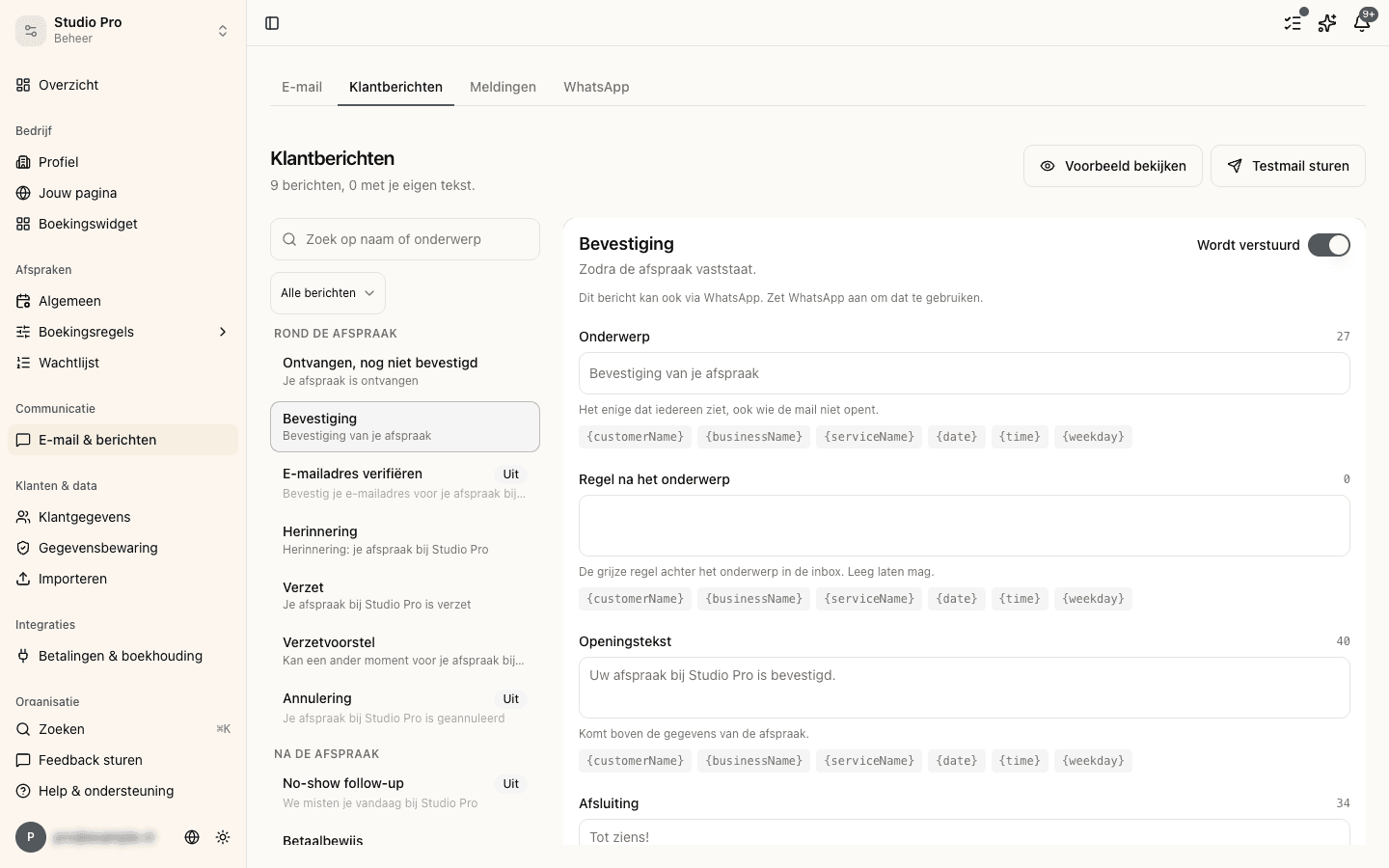
The Customer messages screen: the list of messages on the left, the selected message's fields on the right
1

Subject

The line your customer sees in their inbox. Up to now you could not adjust it at all, while together with the sender it is the only thing everybody sees, including everybody who never opens the email.
2

Preheader

The little sentence most email programs show after the subject.
3

Intro and closing

Your own words above and below the body of the email.
4

Button text

The text on the button, where the message has one.

Not every message has all five. That is not an omission: the proposal for a new appointment has no branding block, for instance, so there only the subject and the preheader are yours.

You see it before your customer does

Next to every message sits View example, and that example runs through exactly the same build-up as the real email. What you see in the example is what gets sent.

If you want to see it in your own inbox, Send test email sends it to your own address. Not to an address you type in: that is deliberate, because a button that sends arbitrary text to an arbitrary inbox from our sending address is something other than a test button.

ℹ️

A test email does not end up in a customer's message history. That history is what your customer really received, and a proof copy to yourself does not belong in it.

What you do not lose

If you had already written an intro or closing of your own on one of the four emails that allowed it, it is still there. Those texts have moved along to the new screen.

The default text is in there as grey placeholder text, not as a filled-in value, so you can always tell which words are yours and which are ours.

More about this in the help centre

  • In-app notifications
  • Email reminders and confirmations

In this article

  • What is new
  • You see it before your customer does
  • What you do not lose
Stippa

Appointment scheduling, without the hassle.

Start 14 days free

Product

  • Features
  • Pricing
  • Demo
  • FAQ
  • Contact
  • System status

Features

  • Booking widget
  • Online payments
  • Reminders
  • No-show prevention
  • Online calendar
  • Client management

For whom

  • For salons
  • Beauty salons
  • Physiotherapists
  • Coaches
  • Personal trainers

Legal

  • Privacy policy
  • Terms of service
  • Data processing agreement

© 2026 Stippa. All rights reserved.

De Rechter Software · Molenwater 20, 4511 BN Breskens · KvK 98466402 · btw NL005332100B80

······
Start 14 days free

14 days free. No card needed.